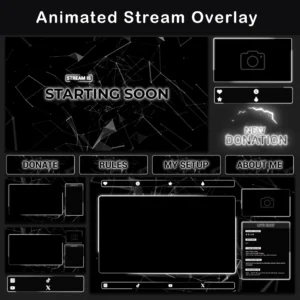
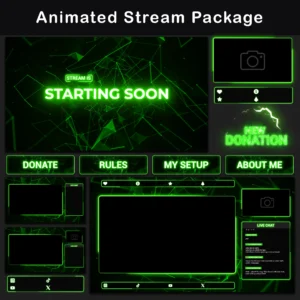
TikTok Live Overlay Pack with Luminescent Hexagonal Design
This TikTok Overlay Pack follows a neon-futuristic design philosophy that prioritizes high contrast and geometric precision for mobile streaming. The screens showcase luminescent hexagons with mirrored floor reflections that drift slowly across deep black backgrounds, while bright neon green accents create striking visual separation. Interactive elements like the chatbox and webcam frames feature moving neon borders that travel smoothly around rounded edges, maintaining viewer engagement without overwhelming the content.
Key Features
- Hexagonal geometry effects – Luminescent hexagons with mirrored floor reflections create depth and visual interest that sets your stream apart from standard flat overlays.
- Moving neon frame accents – Bright neon borders travel continuously around rounded frames on social media elements, webcam, and chatbox, keeping viewers visually engaged during slower stream moments.
- Vertical streaming optimization – The Animated TikTok Live Overlay Pack in black and green includes dedicated frames that organize main screen, cameras, and chat window specifically for mobile streaming layouts.
- Subtle motion design – Slow drifting movement with gentle light pulsation maintains professional appearance while adding dynamic visual interest that doesn’t compete with your content.
- Unified color consistency – Every element shares the same neon green and black contrast theme, creating a cohesive visual identity across all stream components.
Package Contents – The TikTok Live Overlay Pack contains:

3 Animated TikTok Screens
WebM, PNG, MP4 — Starting Soon, End, BRB. Eliminates dead air during stream transitions when you need to step away or prepare content.
12 Vertical Stream Overlays
WebM, PNG, MP4 — Multiple layouts. Solves the challenge of creating professional-looking mobile stream layouts without design experience.


3 Stream Alerts
PNG — New Follower, New Gift, New Sub. Addresses the need for immediate viewer acknowledgment during live streams. Provides instant visual feedback to acknowledge viewer engagement without interrupting your content flow.
4 Animated Social Media Lower Thirds
WebM, PNG — These elements display your social media handles with moving neon accents that draw attention to your other platforms.
Additional background no text
WebM, PNG, MP4 — This blank background lets you create custom layouts beyond the premade options.
Additional blank widgets
WebM, PNG — These empty panels give you space to add custom information or branding elements.
Additional Icon pack
PNG — hese icons help you customize widgets and create personalized stream elements.
Technical Specifications – Technical details for the TikTok Live Overlay Pack:
- Resolution: 1920x1080px
- File Formats: PNG, MP4, WebM
- Screens Duration: 10 seconds (MP4)
- Overlays Duration: 10 seconds (WebM)
- Static Elements: PNG format
- Language: English
- Compatibility: TikTok Live Studio, OBS Studio, Streamlabs Desktop
Important Notes
- TikTok Live Studio does not support direct file import. You’ll need to position overlay elements manually
- Preview .WEBM files by loading them into a streaming program or dragging them into a web browser
- The text is not editable
- The alerts and overlays do not have sound. Stream overlays package is provided in English. After purchase, all files are available for immediate download. This pack provides everything needed for professional mobile streaming setup.
FREQUENTLY ASKED QUESTIONS (CLICK TO EXPAND) ▼
How do I set up these overlays for TikTok Live?
TikTok Live Studio is the official streaming software for TikTok. Add overlay files as Image or Media sources and position them manually on the canvas. The Animated TikTok Live Overlay Pack in black and green requires manual placement of each element since TikTok Live Studio doesn’t support automatic scene imports. OBS Studio and Streamlabs Desktop also support all included file formats, though streaming to TikTok through third-party software isn’t officially supported by the platform.
What software do I need?
TikTok Live Studio (free, official TikTok app) handles all file formats included in this TikTok Overlay Pack: PNG, MP4, and WebM. OBS Studio and Streamlabs Desktop work with these files too, though TikTok doesn’t officially support streaming through third-party software. The luminescent hexagonal elements and moving neon frame accents display correctly in all these programs.
Can I edit the text on the overlays?
The video and image files have baked-in text and aren’t editable. However, this pack includes blank widgets and additional backgrounds without text for custom layouts. You can use the additional background files and blank widgets to create personalized arrangements with the same neon green and black contrast theme.
Do the alerts have sound?
No, the alerts don’t include sound. Sound can be added separately through your streaming software by attaching an audio file to the alert source. The three included alerts (New Follower, New Gift, New Sub) focus on visual impact with the hexagonal geometry effects and consistent color scheme.
Why do WebM files look washed out when I open them on my computer?
This is a typical Windows preview issue, not a file defect. Windows media players don’t correctly render the alpha channel (transparency) in WebM files, which causes distorted colors. To verify the actual quality of the moving neon borders and luminescent hexagons, drag the file into a web browser (Chrome or Firefox) or load it directly into your streaming software.
Discover More Professional Streaming Overlays
- Sale!

TikTok Live Overlay Pack – Vertical Pixelated Retro TV VHS Style
Original price was: $13.97.$6.97Current price is: $6.97. - Sale!
TikTok Live Overlay Pack, Animated Retro CRT Vertical Stream Layout, Neon Red Terminal Style Streaming Package
Original price was: $13.97.$6.97Current price is: $6.97. - Sale!
Black and White TikTok Overlay – Dark Vertical Streaming Pack
Original price was: $13.97.$6.97Current price is: $6.97. - Sale!
TikTok Live Overlay – Neon Pink Animated Vertical Stream Pack
Original price was: $13.97.$6.97Current price is: $6.97. - Sale!
TikTok Live Overlay – Minimalist Grunge Black and White Pack
Original price was: $13.97.$6.97Current price is: $6.97. - Sale!
TikTok Live Overlay – Animated Neon Blue Vertical Stream Package
Original price was: $13.97.$6.97Current price is: $6.97. - Sale!
TikTok Live Overlay Pack – Vertical Animated Black & White Grunge Stream Layouts
Original price was: $13.97.$6.97Current price is: $6.97. - Sale!
TikTok Live Overlay Pack – Animated Retro CRT Vertical Stream Layout
Original price was: $13.97.$6.97Current price is: $6.97.