Why Choose This Grunge Film Twitch Overlay Pack?
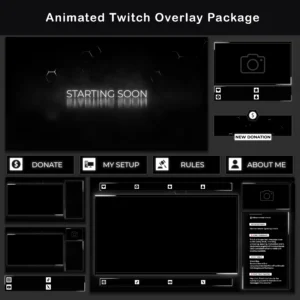
This Twitch Overlay Pack recreates the look of early analog cinema through digital simulation of celluloid film degradation and projector optical defects. The Animated Grunge Film Twitch Overlay Pack pairs a strict monochrome palette with procedurally generated dust, scratches, and luminance flicker across every animated element. The result is a raw, high-contrast grunge aesthetic with intentionally choppy motion and heavy film grain that sets this package apart from standard polished stream overlays.
Key Features
- Analog Projector Simulation: The animations reproduce mechanical instabilities of a film projector, including rhythmic lens breathing, exposure fluctuation, and frame-by-frame particle changes. This level of detail creates an on-screen identity rarely seen among animated twitch overlays.
- Monochrome Grunge Palette: An achromatic color scheme built on muted whites and faded blacks keeps the visual hierarchy focused on stream content. No chromatic accents compete with the game feed or webcam, making this Twitch Overlay Pack compatible with any existing channel branding.
- Seamless Loop Architecture: All animated elements in this Twitch Overlay Pack loop without visible cuts, jumps, or stutters. The flicker and grain patterns reset invisibly, maintaining continuous playback throughout multi-hour streaming sessions.
- Ink Bleed Typography with Focus Blur: Text elements use a Display/Grunge typeface with deliberate edge erosion and ink bleed effects. Combined with animated focus blur cycling between sharp and soft states, the typography reads as printed on degrading film stock rather than placed digitally.
- Procedural Dust and Scratch Layer: A continuously randomized particle overlay of hair, dust specks, and vertical scratches covers every scene. The pattern changes frame by frame, so no two moments on screen look identical, adding organic texture that evolves throughout the stream.
Package Contents
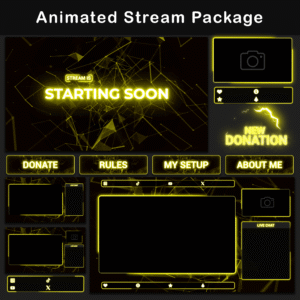
The Animated Grunge Film Twitch Overlay Pack includes over 80 files covering every element needed for a complete stream setup:

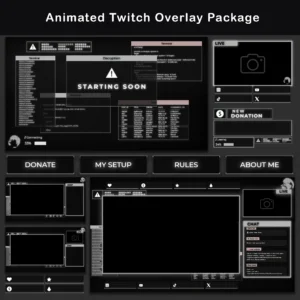
3 Animated Screens
MP4, PNG — Starting Soon, BRB, Stream Ending + Offline (static). These cover every standard streaming phase, removing the need to source or build individual screen graphics.
6 Animated Overlays
WebM, PNG — Multiple layouts with and without camera and chat boxes. Different scene configurations adapt to Just Chatting, Gameplay, and full-screen setups without manually repositioning elements.


10 Animated Alerts
WebM, PNG — Gifted Sub, Hype Train, Incoming Raid, New Cheer, New Donation, New Follower, New Host, New Subscriber, Prime Subscriber, Resubscribe. Full alert coverage ensures no viewer interaction goes unacknowledged on screen.
3 Animated Webcam Overlays
WebM, PNG — Formats for 3:4, 4:3, and 16:9 webcams + masks. Three aspect ratios match any camera configuration without stretching or cropping.


40+ Twitch Panels
PNG — About, Rules, Donors, Setup, Socials, and more. A full panel set extends the grunge film look of this Twitch Overlay Pack below the video player, keeping the channel page visually cohesive.
14 Stream Labels and Social Bars
WebM, PNG — Animated labels and social bars display follower counts, latest events, and social links in the same aged film style as the rest of the overlays for streaming.


6 Chatboxes
WebM, PNG — 3 transparent (75% opacity) + 3 solid background. Two opacity options allow chat readability to be balanced against game visibility depending on the active scene.
1 Animated Stinger Transition
WebM — A matched scene-change animation maintains visual continuity between stream segments.
Extras
WebM, PNG — Additional blank frames for flexible scene composition and custom layouts.

Technical Specifications
- Resolution: 1920x1080px (Full HD)
- Screens: 10-second loop (MP4)
- Premade Overlays: 10-second loop (WebM)
- Alerts: 5-second duration (WebM)
- Stinger Transition: 2-second duration (WebM)
- File Formats: PNG, MP4, WebM
- Compatibility: OBS Studio, Streamlabs Desktop
- Language: English
Important Notes
- Text in animated files is baked into the video and cannot be edited. Blank background versions are included for adding custom text in OBS.
- Alerts and animated stream overlay files do not include sound effects. Custom audio can be assigned within the streaming software.
- To preview .WebM files accurately, load them into a web browser (Chrome, Firefox) or directly into OBS/Streamlabs. The Windows built-in video player does not render the alpha channel correctly, which may cause colors to appear distorted.
- This Twitch Overlay Pack is provided in English.
Instant Access
After purchase, all files in this Twitch Overlay Pack are available for immediate download. The package includes pre-made Scene Collection files for OBS Studio and Streamlabs, along with PDF setup documentation and video tutorials for importing scenes in OBS Studio and Streamlabs.
Discover More Professional Streaming Overlays
- Sale!

Neon Pink Twitch Overlay Pack | Animated Stream Layout for OBS
Original price was: $19.97.$10.97Current price is: $10.97. - Sale!
Retro CRT Twitch Overlay Package
Original price was: $19.97.$10.97Current price is: $10.97. - Sale!
Animated Stream Overlay – Retro 80’s Hacker Glitch Package
Original price was: $19.97.$10.97Current price is: $10.97. - Sale!
Neon Twitch Overlay Package | Animated Stream Pack
Original price was: $19.97.$10.97Current price is: $10.97. - Sale!
Twitch Overlay Package – Animated Retro 80s CRT Terminal
Original price was: $19.97.$10.97Current price is: $10.97. - Sale!
Animated Minimalist Glitch Stream Overlay Pack
Original price was: $19.97.$10.97Current price is: $10.97. - Sale!
Twitch Overlay Pack – Animated Minimalist Neon Plexus
Original price was: $19.97.$10.97Current price is: $10.97. - Sale!
Twitch Overlay Pack – Animated Black and White Neon Glow
Original price was: $19.97.$10.97Current price is: $10.97.