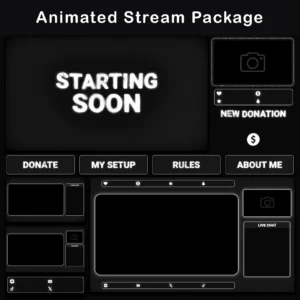
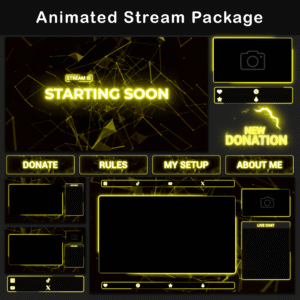
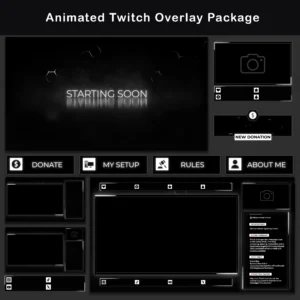
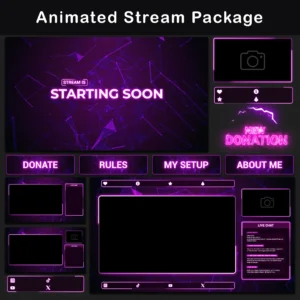
Full Breakdown of This Twitch Overlay Pack
Twitch Overlay Pack built on plexus geometry: a spatial network of glowing orange nodes and connection lines against a solid black canvas. The Plexus Neon Orange Twitch Overlay Pack creates a minimalist, high-contrast channel identity where every UI element stays readable without competing with gameplay footage.
Each category of assets carries its own motion signature. Screens and premade stream overlays feature a slowly rotating plexus grid in the background, while webcam frames and chatboxes use flowing neon orange lines along their borders. Alerts break the pattern deliberately with a white-orange burst effect and spring-like motion that snaps viewer attention to notifications.
Key Features
- Plexus Network Backdrop on Screens and Overlays: A slowly drifting grid of connected nodes fills the background of animated screens and premade overlays. Viewers see a structured, technical look that adds spatial depth without pulling focus from the main content area.
- Burst-Style Alert Animations: Unlike the smooth, slow-moving elements in the rest of this Twitch overlay pack, alerts use a concentrated white-orange flash with energetic motion. Each notification (follows, cheers, raids, subs, donations, hosts) registers instantly on screen against the calm baseline aesthetic.
- Dual Aspect-Ratio Webcam Frames: Neon-bordered animated webcam overlays ship in both 16:9 and 4:3 formats. Switching between a widescreen and standard camera crop keeps the orange neon border consistent regardless of the hardware setup.
- Six Chatbox Variants with Transparent and Solid Options: Three transparent versions at 75% opacity let gameplay remain visible behind the chat feed. Three solid-background versions maximize text readability during high-traffic scenes like Just Chatting.
- One-File Scene Collection Import: Pre-built scene collection files for OBS Studio and Streamlabs position every animated stream overlay, webcam frame, and chatbox in the correct layer order. A full channel setup that would normally take hours of manual placement drops to a single file import with this Twitch overlay pack.
Package Contents

3 Animated Screens
MP4, PNG — Starting Soon, BRB, Stream Ending + Offline (static). Covers every stage of a streaming session so the channel never displays an unbranded screen between segments.
6 Animated Overlays
WebM, PNG — Multiple layouts with or without camera and chat boxes. Pre-arranged compositions eliminate the need to manually position webcam, chat, and game capture sources for each scene.


6 Animated Alerts
WebM — New cheers, donations, followers, hosts, raids, and subscriptions. Dedicated animations for each notification type give viewers clear visual feedback without all alerts blending into one generic effect.
2 Animated Webcam Overlays
WebM, PNG — Formats ratio (16:9, 4:3). Two aspect ratios cover standard and widescreen cameras, preventing stretched or cropped borders when switching setups.


30+ Twitch Panels
About, Rules, Donors, Setup, Socials, and more. A full set of info panels in the same neon plexus style keeps the channel page visually consistent below the player.
14 Stream Labels and Social Bars
WebM, PNG — Social media handles and support labels. Animated tickers and bars display social links and recent events directly on the stream without needing third-party widgets.


6 Chatboxes
WebM, PNG — 3 transparent (75%) + 3 solid background. Toggle between transparent and solid depending on whether gameplay visibility or chat readability is the priority for a given scene.
1 Animated Stinger Transition
WebM — Neon-edged panels cut across the screen during scene changes, keeping transitions visually tied to the rest of the Twitch overlay pack aesthetic.
Extras
WebM, MP4, PNG – Clean frames without text for adding custom labels in OBS using any preferred font. Text-free screen backgrounds for adding personalized text or different-language titles directly in the streaming software.

Technical Specifications
- Resolution: 1920x1080px (Full HD)
- Screens: 15-second loops (.MP4)
- Premade Overlays: 15-second loops (.WebM)
- Alerts: 5-second animations (.WebM)
- Stinger Transition: 2-second animation (.WebM)
- Static Elements: .PNG
- File Formats: PNG, MP4, WebM
- Language: English
- Compatibility: OBS Studio, Streamlabs Desktop
Important Notes
- Preview .WebM files by loading them into OBS, Streamlabs, or by dragging them into a web browser (Chrome/Firefox). Windows media players do not render the alpha channel correctly, which may cause colors to appear washed out or distorted.
- Text on animated screens and stream overlays is not editable. Use the included blank backgrounds to add custom text directly in the streaming software.
- Alerts and animated twitch overlays in this package do not include sound. Custom alert sounds can be assigned within OBS Studio or Streamlabs.
- This stream overlays package is provided in English.
After purchase, all files in this Twitch overlay pack are available as an instant download. Import the included scene collection file into OBS Studio or Streamlabs to have every element positioned and ready for the next stream.